AI Design
B2B Enterprise
SaaS
FlairX — Redesigning the Recruiter Workflow
Streamlining résumé parsing, bulk uploads, and scheduling so teams spend less time on admin and more time on candidates.
Project Overview
FlairX is a B2B interview-as-a-service platform that matches shortlisted candidates for a job opening with expert interviewers to conduct technical coding interviews.
My Role
UX / UI / Product Designer
• Workflow design
• Interaction patterns
• AI-assisted automation
• Research & validation
Collaborated With
• Founder / CEO
• Product Team
• Frontend Engineers
• Backend Engineers (ATS & parsing logic)
Tools & Collaborations

Figma

Jira

Notion

Slack
Context
We’re simplifying the entire candidate intake process and integrating AI to do it.
Résumé parsing
Bulk uploads
ATS imports.
The workflow I inherited was slow, manual, and filled with repetitive steps.
My job was to redesign it into an intelligent, automated system that reduced friction while keeping recruiters fully in control.
Problem
Recruiters were spending hours typing candidate details, uploading résumés one-by-one, and fixing data errors all before an interview could even be scheduled. The workflow was slow, repetitive, and mentally exhausting.
User Frustrations
“Why am I entering the same information again and again?”
“Bulk uploads break or miss details I don’t trust it.”
“If I make one mistake, the entire flow collapses.”
“I wish the system would just do this for me.”
AI Possibilities
This workflow was a perfect match for automation:
AI-powered résumé parsing to extract clean candidate data
AI-assisted bulk processing to handle 100+ résumés
AI-based validation to flag missing information
Smart decision support to reduce manual checking
Discovaries
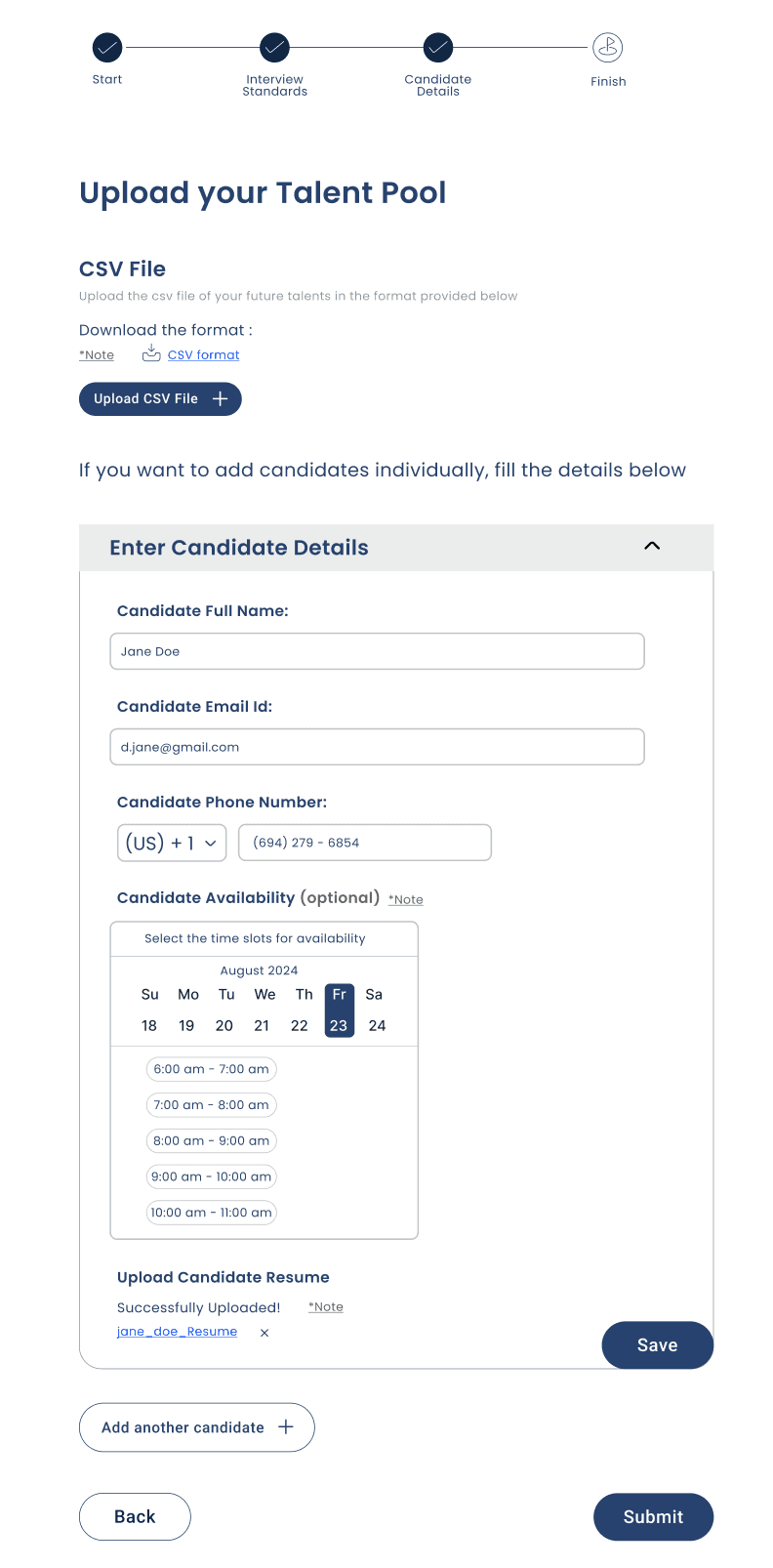
Recruiters were forced to enter all candidate information manually, even when the résumé already contained it.
CSV uploads caused formatting issues, errors, and a general lack of trust in the feature.
Bulk résumé parsing had no transparency users couldn’t see what was extracted, what failed, or what needed fixing.
The system lacked duplicate detection or validation, leading to accidental repeated entries.
Scheduling and availability selection appeared too early in the intake flow, creating confusion and cognitive overload.
AI opportunities were completely unused no auto-extraction, no error detection, no field suggestions, no smart validation.
Design before the changes...
Ideation and flow
Translating insights into structured, simplified workflows.
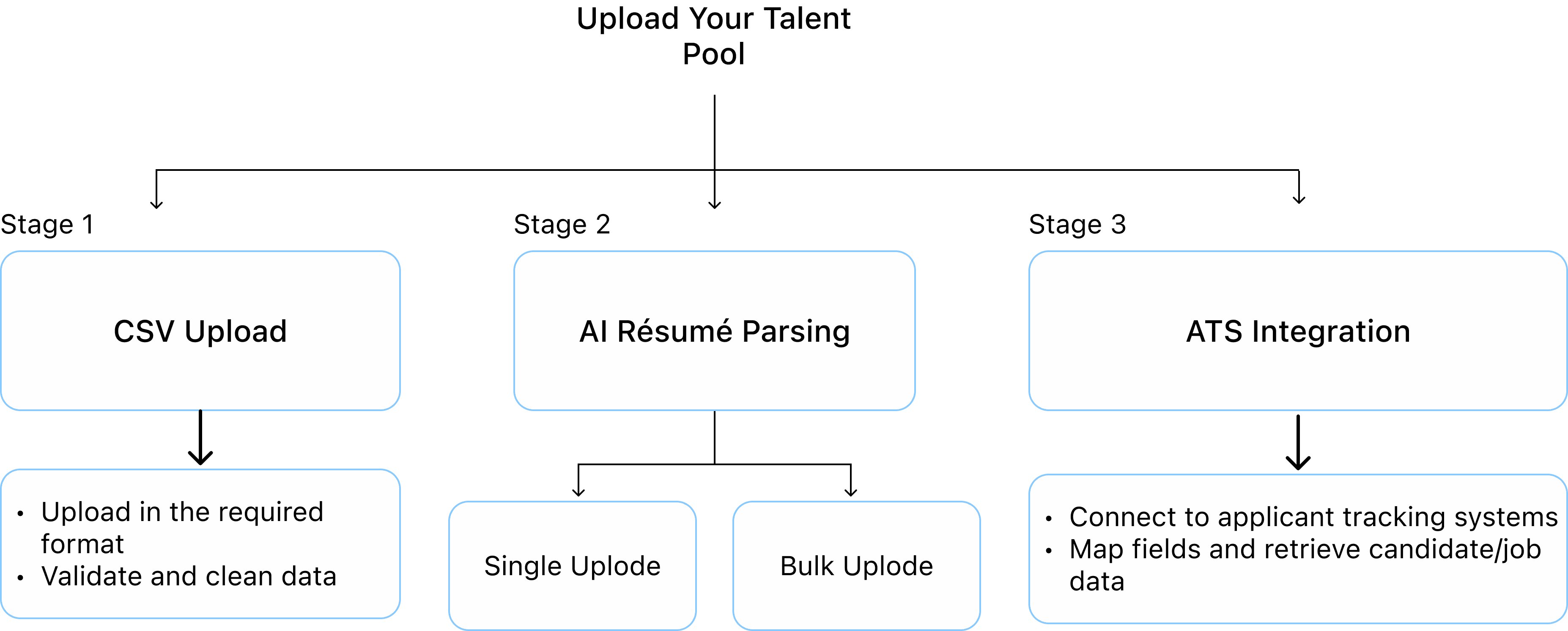
This diagram illustrates the core workflow areas I redesigned: CSV handling, AI-powered résumé parsing, and ATS integrations. During ideation, I explored multiple solution paths within each stage identifying what should be automated, what required user control, and what needed to be removed or restructured. These explorations helped determine which options were feasible, which enhanced user efficiency, and which were intentionally discarded to create a clearer, more scalable workflow.
Design Decisions
Case 1 — Early Direction (Not Approved)
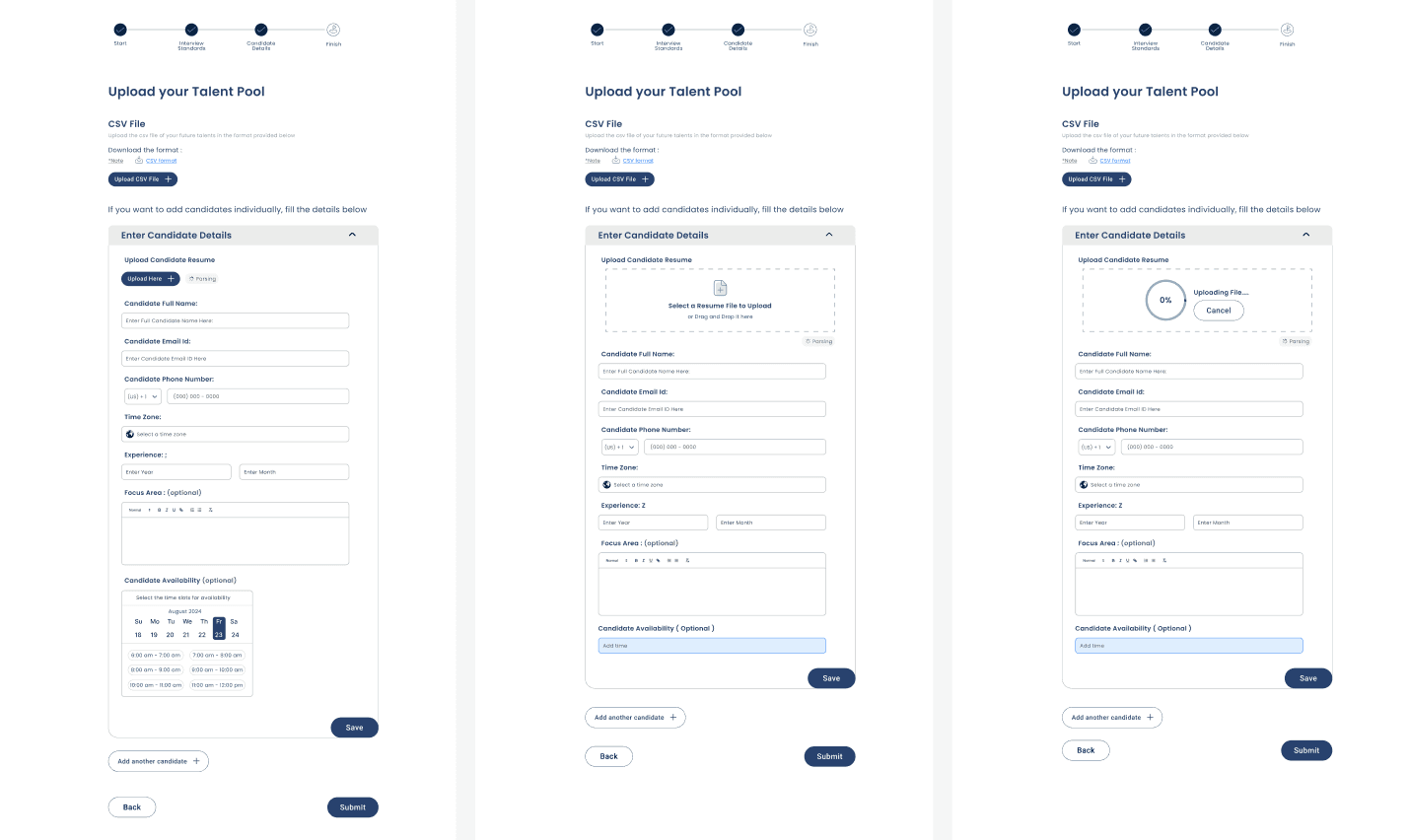
This exploration focused on simplifying the single upload process and restructuring the intake steps. While it helped organize the fields more cleanly, it still relied heavily on manual input and did not fully leverage AI for automation.
Why it wasn’t approved:
Still too much manual data entry
Did not reduce steps meaningfully
No improvement in transparency for bulk uploads
Did not handle edge cases or parsing failures
Case 2 — Multi-Screen Flow (Not Selected)
This direction explored splitting the intake process into multiple screens and transition states. It attempted to separate upload states, validation states, and review states into different pages.
However, as we tested internally, the flow became visually chaotic, harder to follow, and confusing for users to determine what action to take next.
Why it wasn’t approved:
Too many screens for a single task
Cognitive load increased instead of decreasing
Users could not easily find the next actionable step
Risk of abandonment due to unclear progression
Design complexity did not match backend feasibility at the time
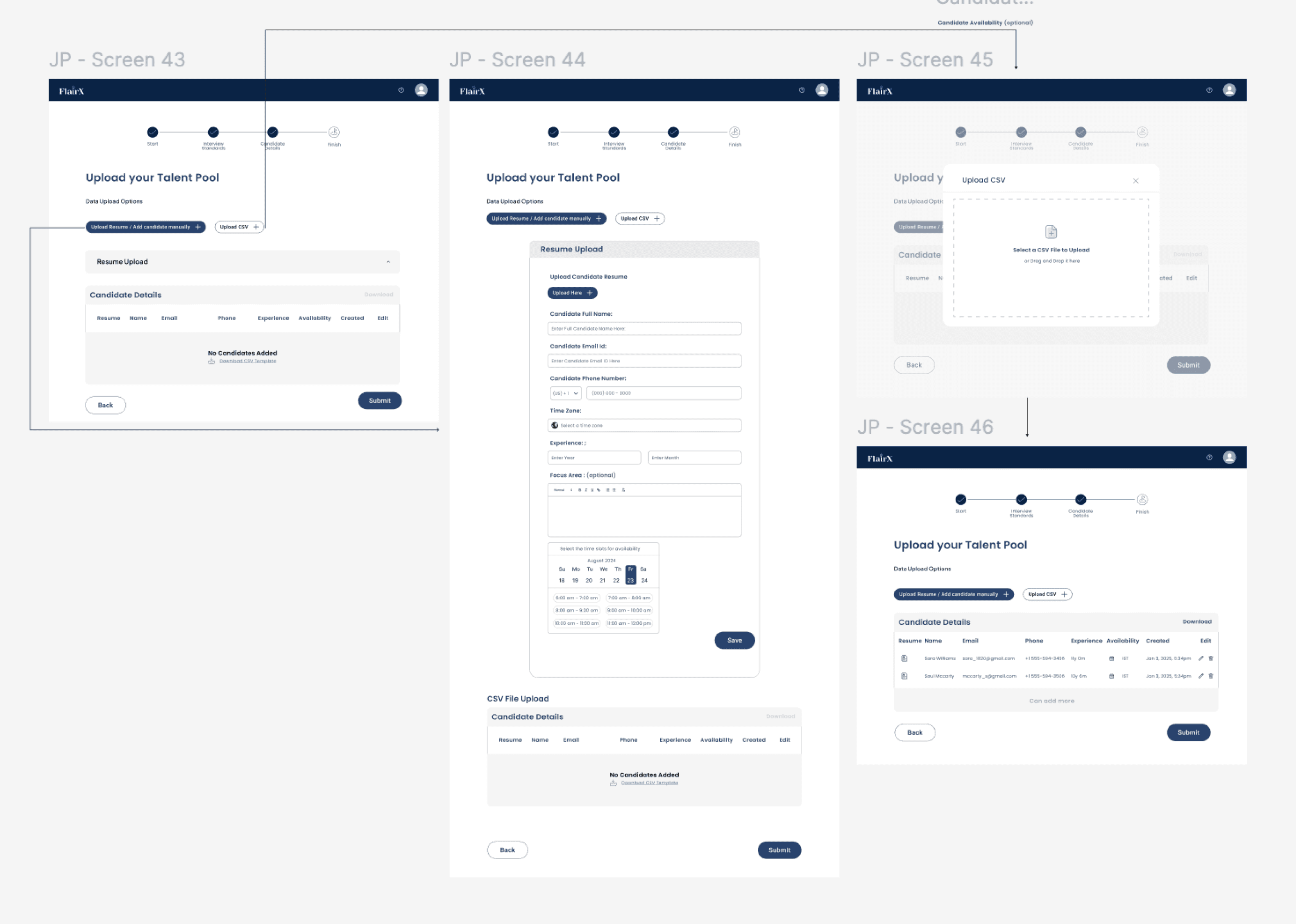
Final Design - Currently in Production
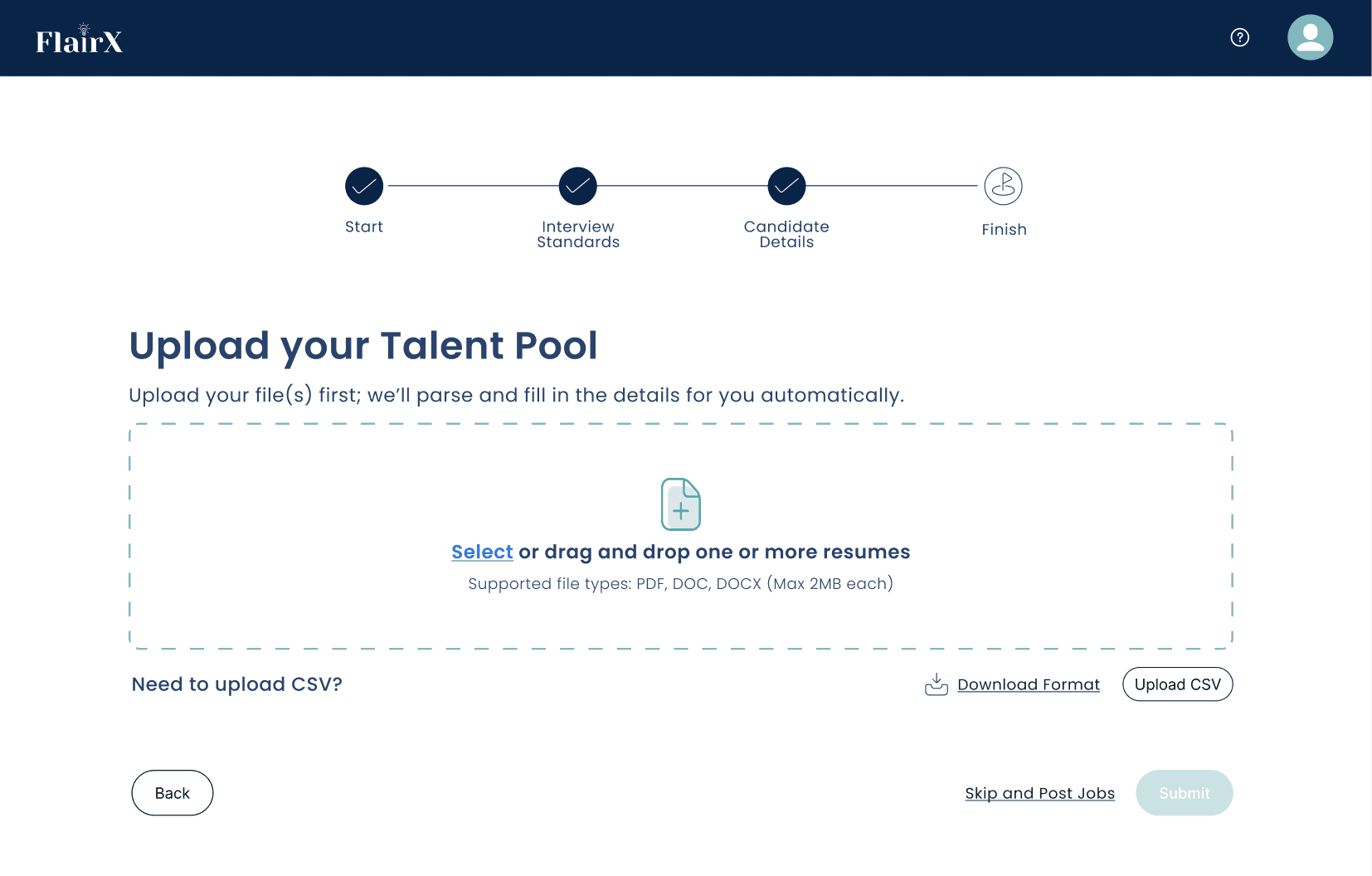
This final design establishes a single entry point for adding candidates. Recruiters can upload one or multiple résumés, and the system automatically extracts key details using AI. The interface is intentionally minimal and action-focused, reducing friction and giving users confidence before they proceed.
Key improvements in the final design:
Clear first step: upload first, review later
AI performs extraction automatically
Drag-and-drop supports single + bulk uploads effortlessly
CSV remains available but deprioritized
Reduced manual inputs
Clean visual hierarchy and guidance
Strong backward/forward navigation
Removed scheduling from intake (less cognitive overload)
This design is now aligned with both user mental models and backend feasibility, and is
currently moving into production.
Single upload "Happy Path"
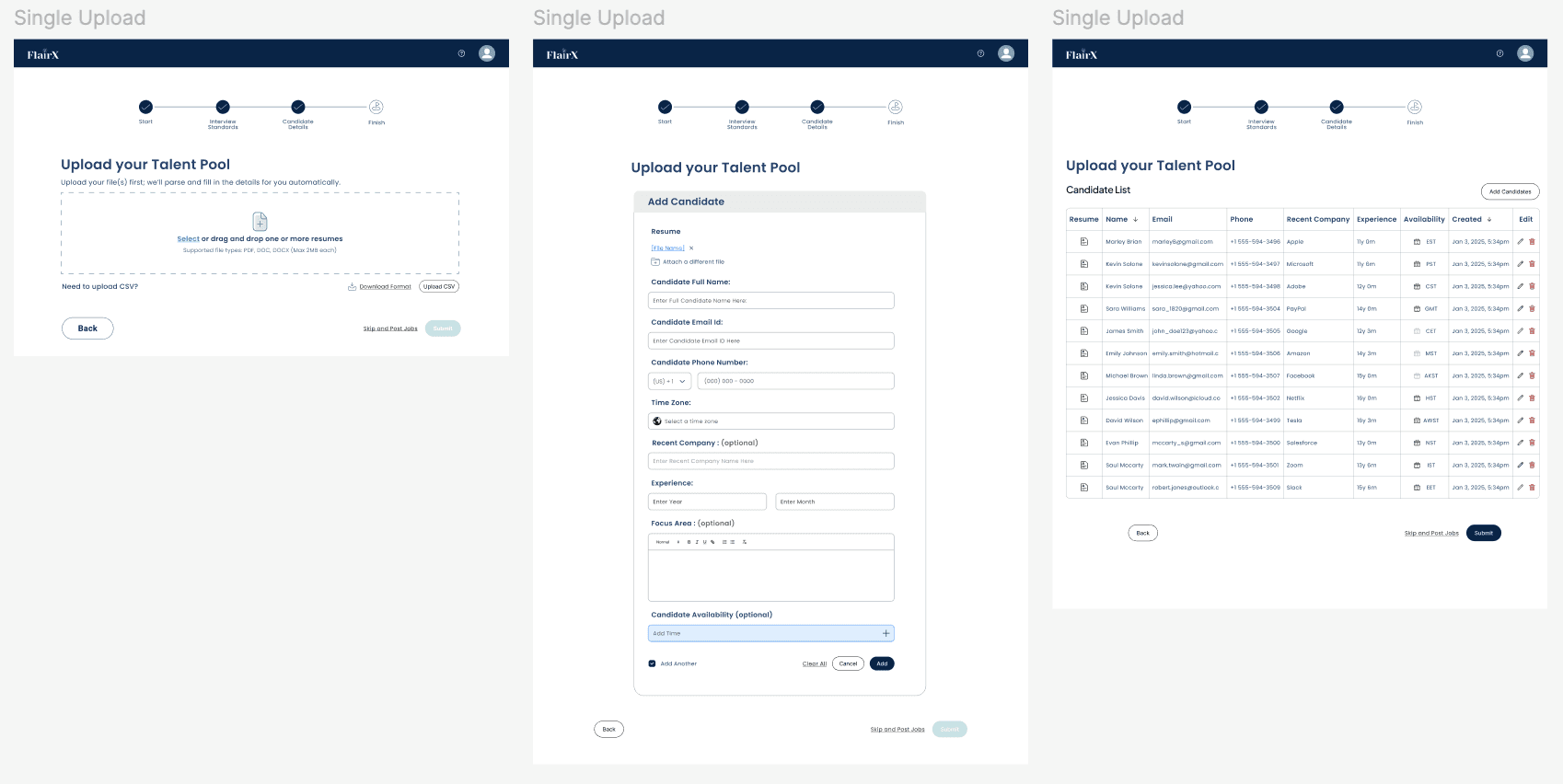
This flow is optimized for adding one candidate at a time. Recruiters upload a résumé, review the AI-extracted fields, and edit only what’s necessary. The experience is simple, linear, and focuses on minimizing manual input.
Key improvements:
AI extracts the core fields automatically
Only incomplete fields require editing
Clear state transitions from upload → review → confirmation
Reduced friction compared to the original version
Bulk upload "Happy Path"
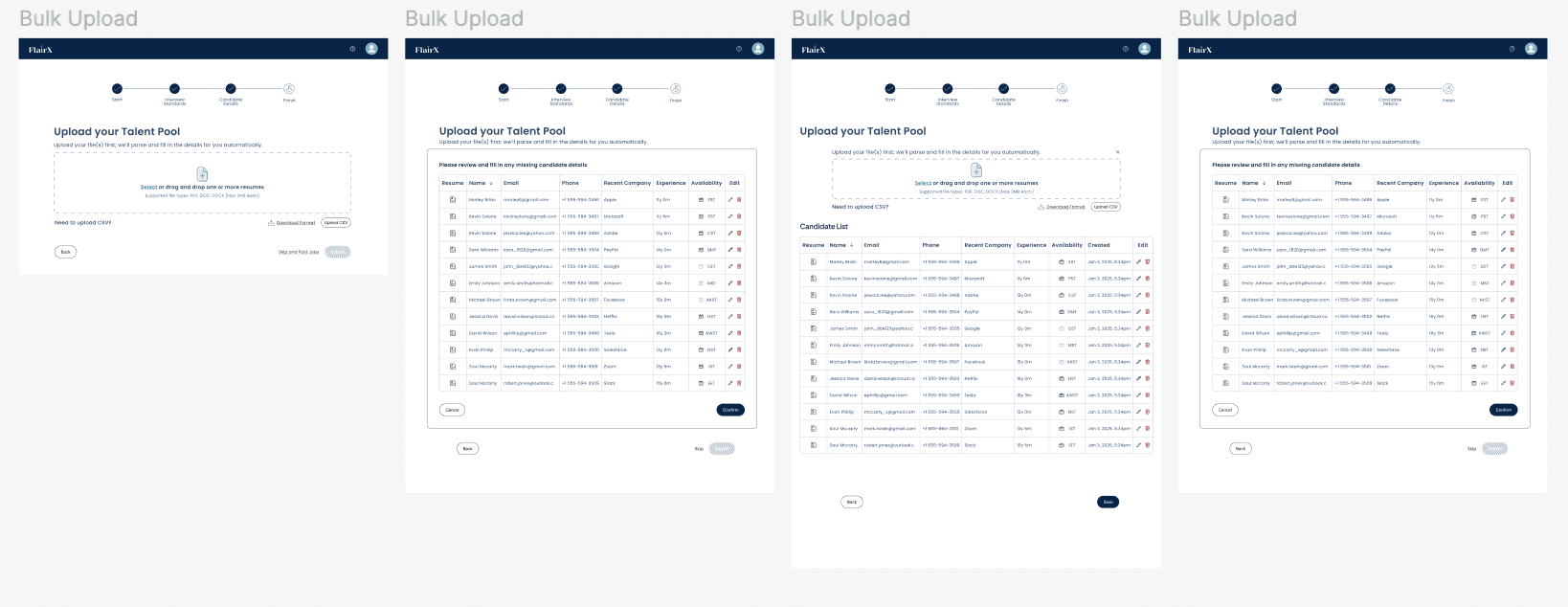
The bulk upload flow supports high-volume hiring by allowing multiple résumés to be uploaded simultaneously. The system displays a parsing summary, highlights missing information, and allows users to fix errors in-line or in bulk.
Key improvements:
Real-time parsing feedback
Missing-field indicators and inline editing
Duplicate detection for large datasets
Bulk confirmation controls
Significantly reduces time from hours → minutes
CSV Upload “ Happy Path “
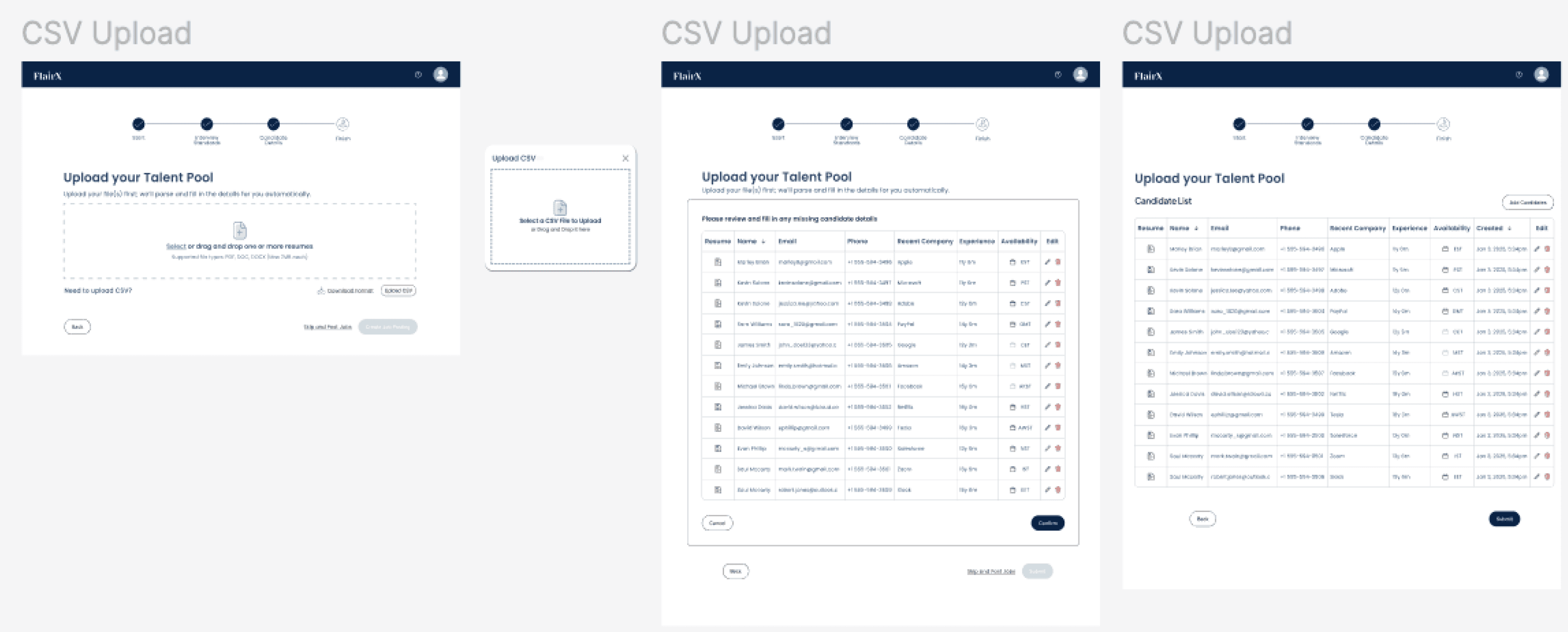
For teams who still prefer structured data uploads, the CSV flow provides a cleaner and more transparent alternative to the original MVP. After upload, the system maps fields, surfaces conflicts, and enables inline correction.
Key improvements:
Stable CSV upload experience
Field-mapping clarity
Conflict resolution flow
Eliminates unpredictable CSV failures
Ensures CSV remains optional, not required
EDGE CASE 1 — Mixed Uploading + Failed Uploads + Successful Uploads
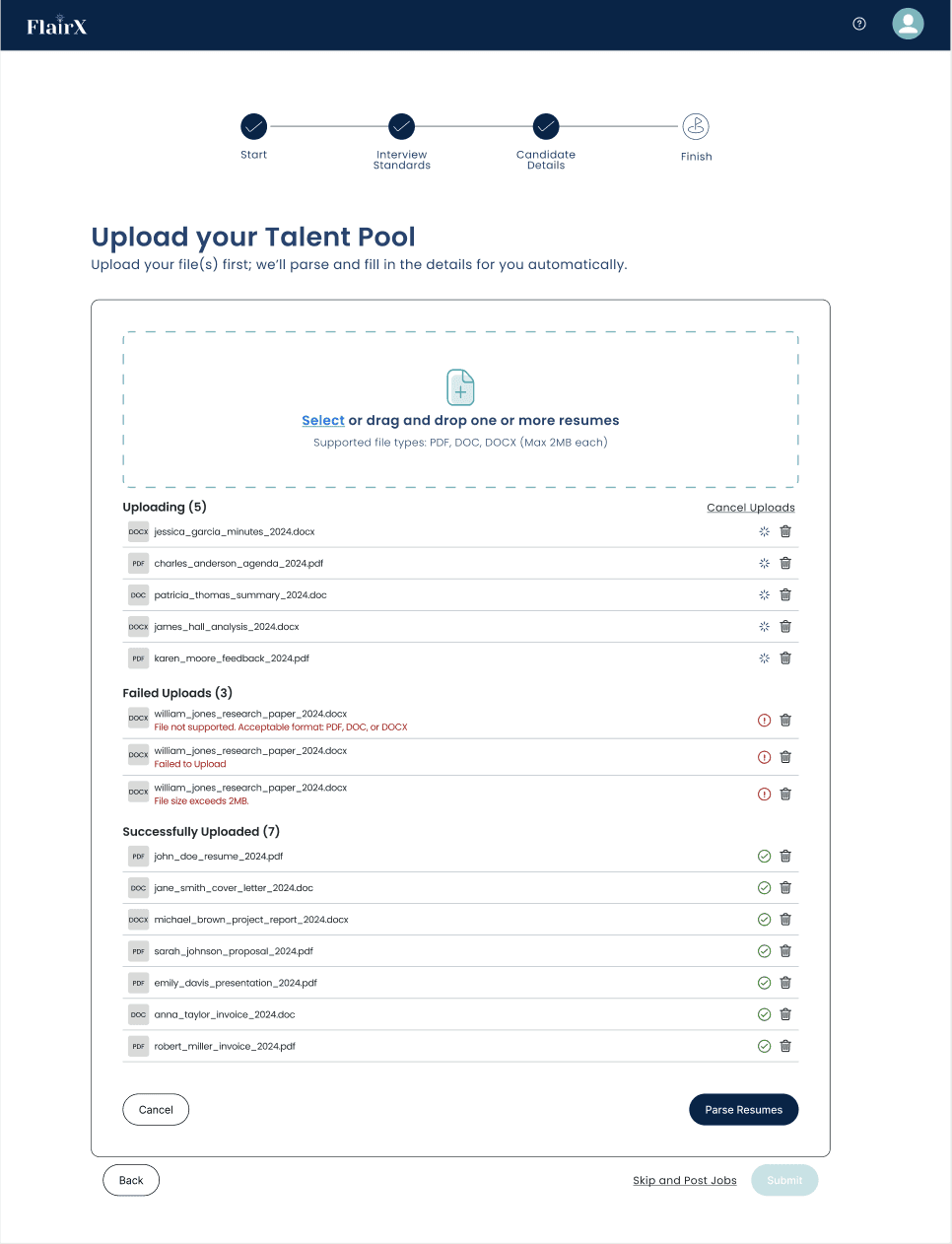
When users upload multiple résumés at once, the system handles each file independently, since not all files behave the same. Some upload successfully, some fail due to formatting issues, and others may still be in progress. To keep the workflow clear and prevent confusion, the interface separates files into three distinct buckets Uploading, Failed Uploads, and Successfully Uploaded so recruiters always understand the current state of the batch.
To preserve system stability, the “Parse Resumes” action is disabled while files are still uploading. This prevents users from accidentally triggering parsing on incomplete batches. If a user chooses to cancel the upload, only the files currently uploading are paused and moved into the Failed Uploads section, while all fully uploaded files remain intact. This ensures users never lose progress on successful uploads.
This approach reduces frustration by:
Showing failures early rather than at the end
Explaining why each file failed (e.g., unsupported format, wrong file type, corrupted file)
Allowing users to remove or replace failed files without restarting the entire batch
Keeping successfully uploaded files untouched and ready for parsing
Preventing accidental parsing before all files are ready
Why it matters:
Large hiring teams often upload 30 -100 résumés at once. A single problematic file or an impatient click should not derail the entire process. This edge-case design ensures the workflow remains stable, transparent, and fully recoverable, even with large, messy data sets.
Edge Case 2— Missing Fields After Parsing
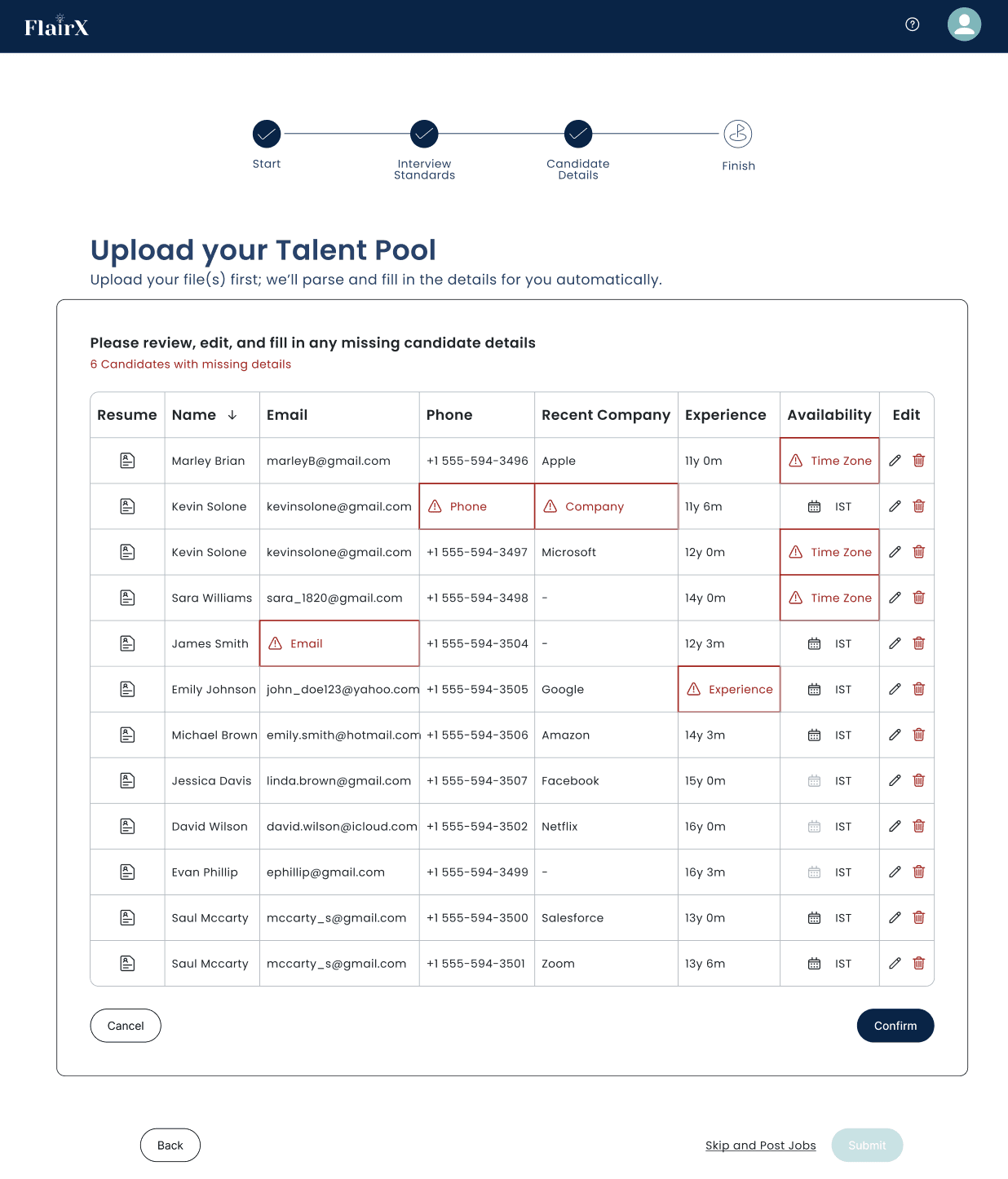
AI-powered résumé parsing significantly accelerates intake, but not all résumés contain clean or complete information. When the system cannot extract mandatory details such as phone numbers, emails, recent company, time zone, or experience, those fields are surfaced as inline warnings within a unified review table. Instead of forcing users to open multiple forms or repeat data entry, the interface highlights only the incomplete fields and enables quick corrections directly in the table.
This design achieves three things:
Minimizes friction by requiring users to fix only what’s missing not retype full profiles
Improves clarity through color-coding, icons, and structured grouping of issues
Supports efficiency when dealing with dozens of candidates at once, making error correction feel lightweight and predictable
By allowing users to resolve incomplete data in a spreadsheet-like format, the system transforms a traditionally painful step into a guided, fast, and human-centered experience.
Edge Case Alerts & Preventive Guidance
To support a safe and predictable workflow, I designed a series of micro-alerts that prevent users from losing work, posting incomplete jobs, or introducing invalid data into the system. These alerts act as guardrails, ensuring that users always understand the consequences of their actions and have a clear way to recover.
Unsaved Files Warning
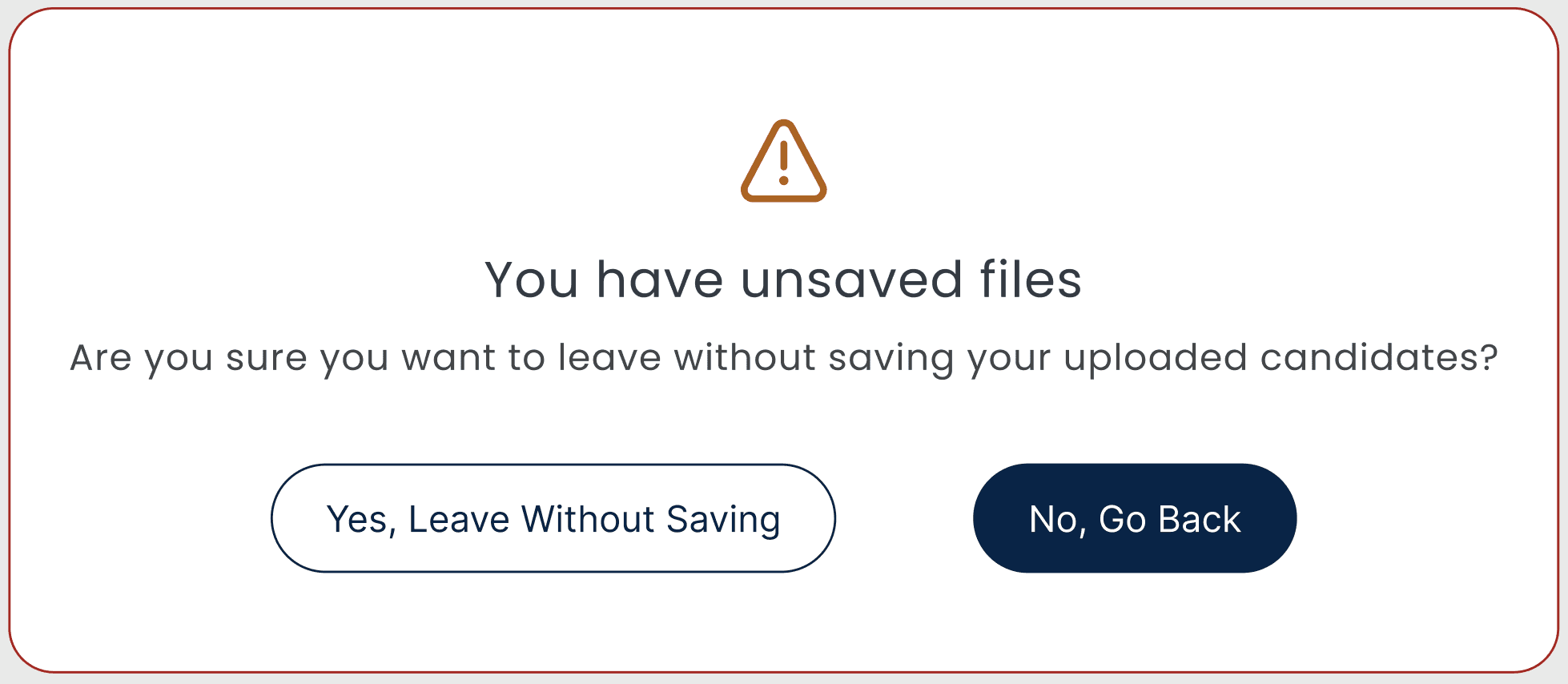
What it does: Alerts users before leaving without saving uploads.
Why it matters: Prevents accidental data loss.
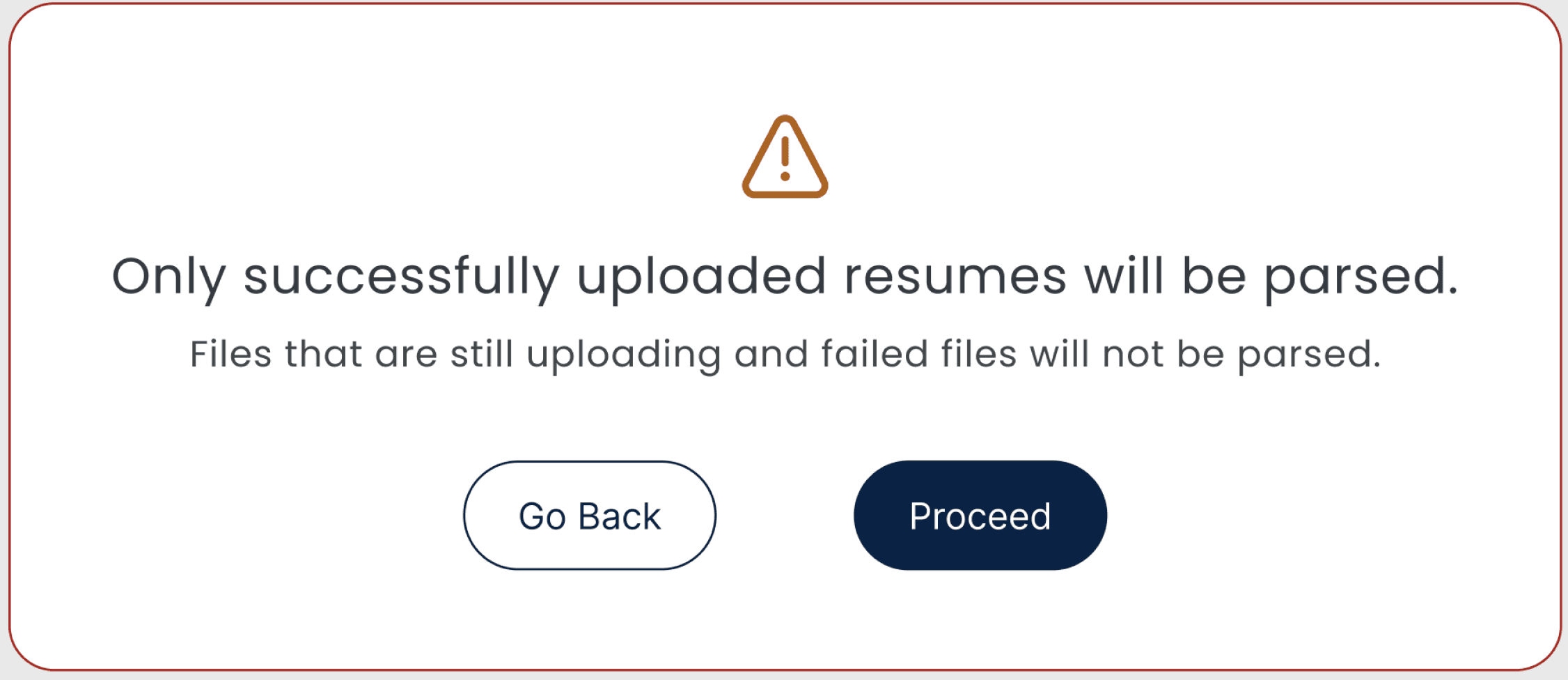
What it does: Informs users that failed or in-progress files won’t be included.
Why it matters: Sets clear expectations during bulk uploads.
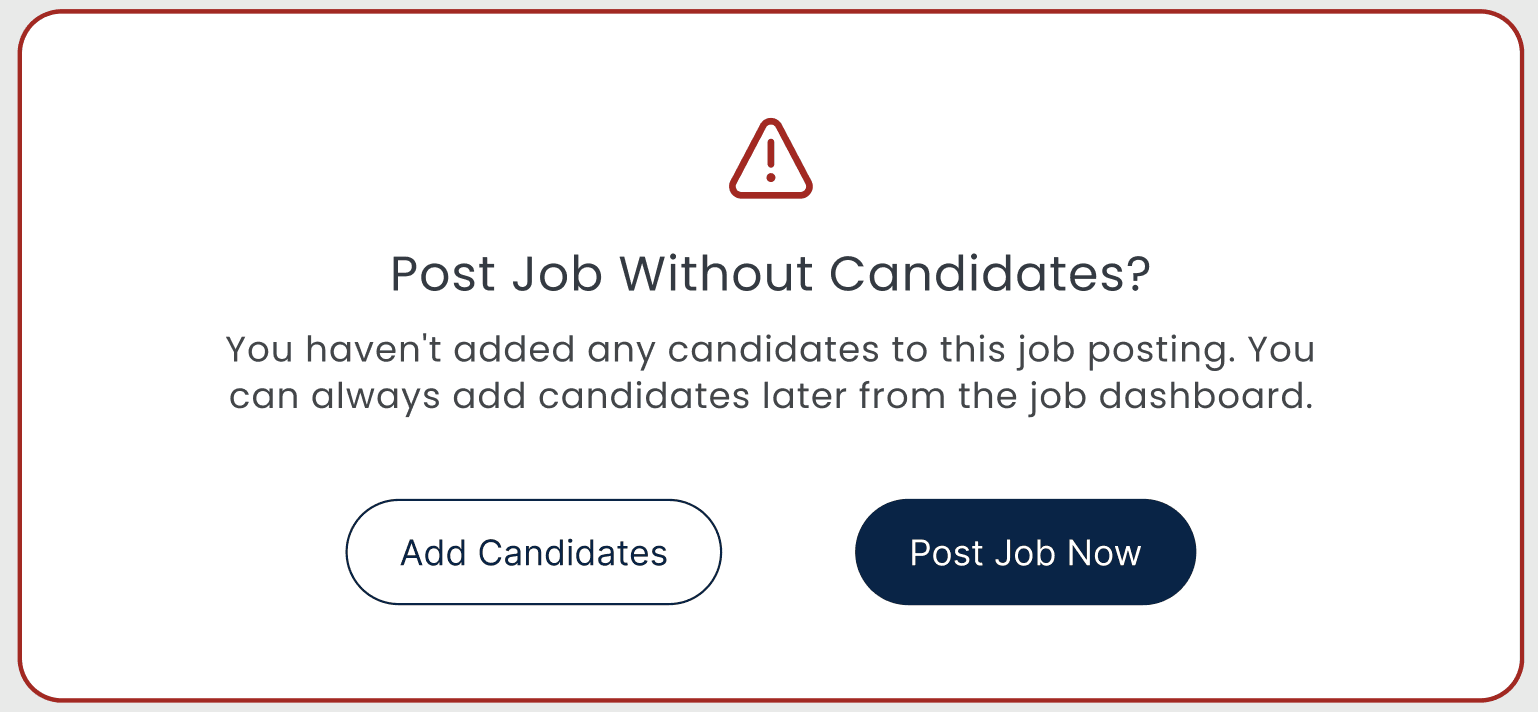
What it does: Warns users when posting a job with no candidates attached.
Why it matters: Prevents empty pipelines and accidental job postings.

What it does: Blocks submission when required fields are still missing.
Why it matters: Ensures data quality while allowing users to proceed with valid candidates.
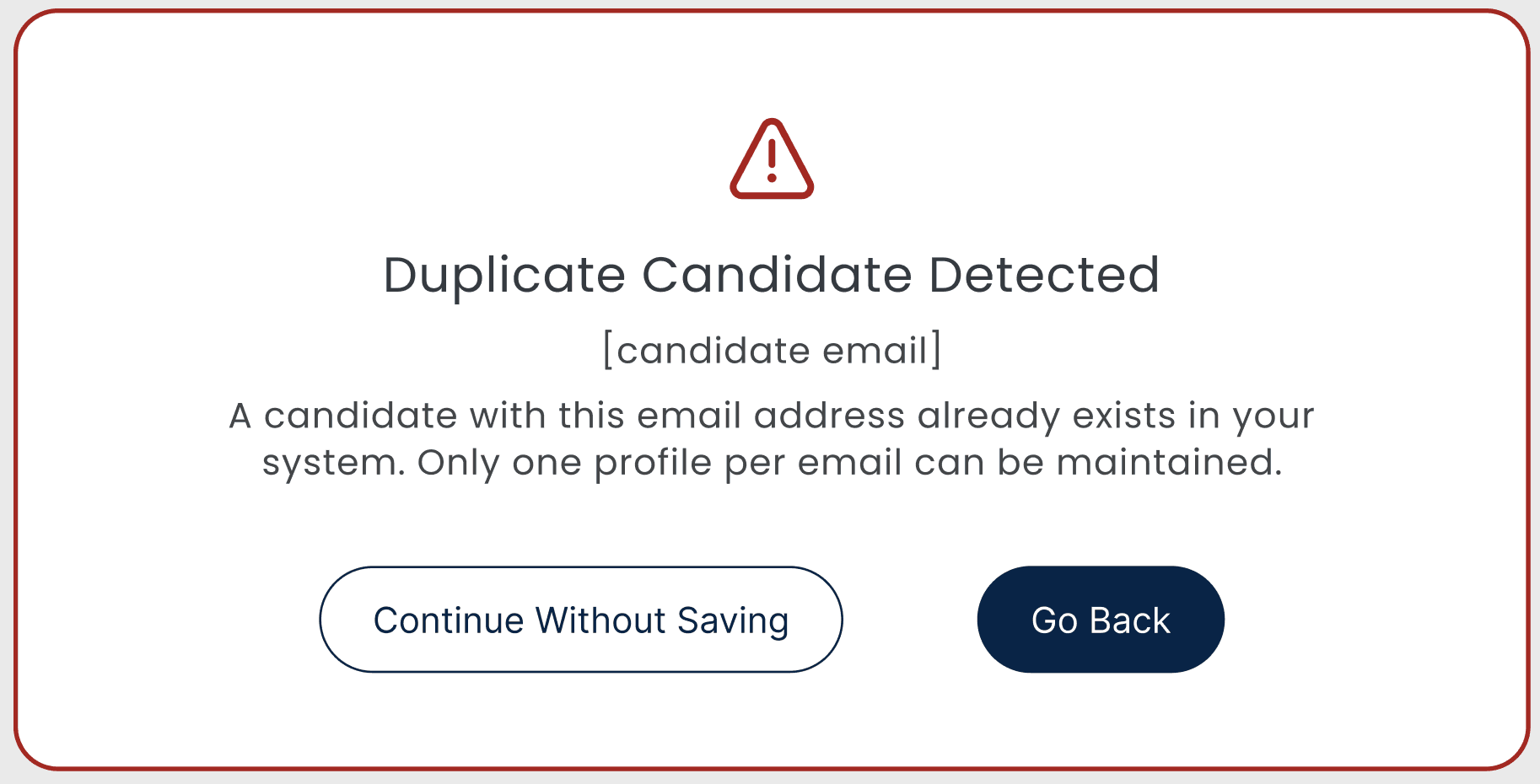
What it does: Flags when a candidate already exists in the system.
Why it matters: Keeps the database clean and avoids duplicate profiles.
It all worked out and with an impact
↓ 4 hrs → ~30 mins
Time to process résumés reduced dramatically.
↓ Duplicate Profiles
System caught and prevented repeated entries.
↑ Data Accuracy
Inline validation improved completeness & quality.
↑ Recruiter Efficiency
Bulk uploads became faster, more predictable, and stress-free.